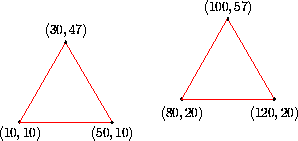
The graphics system we have developed so far has the ability to display points and lines within a clipping rectangle. However, it does not lend itself to a very structured description of the set of objects visible on the display screen.
For example, if I wish to display two identical objects on the display, but offset one of them relative to the other, the only recourse I have is to plot each one completely separately.
This approach is highly inefficient. The obvious structure in the picture is ignored. It would be much better if I could describe the scene as two instances of a particular graphics object.
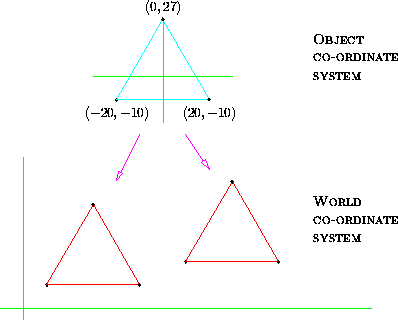
This is what we have in the above. The computer memory contains a sequence of instructions telling it how to display a ``general'' triangle relative to that triangle's own, private, co-ordinate system. This ``general'' triangle (in light blue) is not displayed. Instead, two instances of it are generated by transforming, in a systematic way, the endpoints making up the triangle.
The light blue triangle is like a subroutine in a computer program, it contains instructions to do a particular job (in this case to draw a triangle). The transformations applied to draw the red triangles which appear on the screen are like two calls to the triangle subroutine with different parameters.
The ``subroutine'' which draws a ``generalised'' triangle is often called a segment or segment description in computer graphics.
The co-ordinate system which the segment is defined in is called the object co-ordinate system. The co-ordinate system in which the red triangles are plotted so that they appear beside one another is called the world system.
The study of how to move the segment so that it appears in a particular place in the world co-ordinate system, with a particular size and orientation, is the study of graphics transformations.
There are three important transformations (plus lots of other ones which aren't as useful). These are Translation, Rotation and Scaling.
Any point  in the object co-ordinate
system is replaced by
in the object co-ordinate
system is replaced by  in the world
co-ordinate system. The set of equations governing this transformation
is:
in the world
co-ordinate system. The set of equations governing this transformation
is:

The visible effect on the point
is as follows:
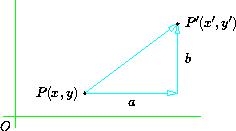
where a is the translation in the x-direction and b is the translation in the y-direction.
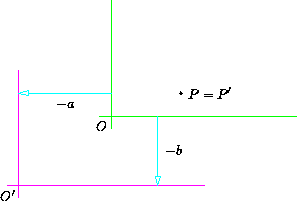
Another way to think of this transformation is as a shift of co-ordinate axes by an amount (-a,-b).
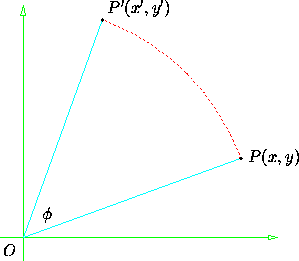
Every point in the object co-ordinate
system is rotated by an angle  anti-clockwise
around the origin to give .
anti-clockwise
around the origin to give .
The equations governing this transformation are:
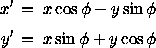
This pair of equations is derived from the formulas for the sines and cosines of the sums of angles.
The equations describe rotation around the origin. However,
a special formula for rotation about an arbitrary point  not needed, as this can be achieved by a composition of transformations.
 .
This moves the origin to :
.
This moves the origin to : 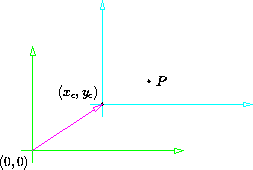
in the new co-ordinate
system. 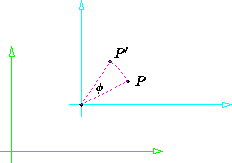
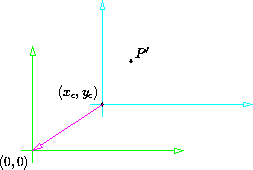
We can represent this mathematically as a composite transformation,
 :
:

where  is the translation,
 is the rotation and
  is the inverse translation.
The operations are applied left-to-right. This is opposite to the usual mathematical convention for the composition of operators.
The matrix representation of rotation gives us very simple way to generate the successive points on a circle. This method is efficient because it requires very few calls to trigonometric functions. Trigonometry is computationally expensive, so any method which allows it to be avoided is very worthwhile.
The trick is to realise that each point on a circle centered at the origin is simple a rotation of the previous point by a small angle.

Each successive point on the circle may be generated from the previous point by multiplication by a suitable rotation matrix. The beauty of this is that the values in the rotation matrix are constants, they only need to be evaluated once, when the angle size is determined.
Here is an implementation of a circle-generating DDA. The value 6.2831853
is an approximation to  .
.
    void Window::circle(float radius,
                        float xc, float yc)
    {
        const int steps = 32;
        const float c = cos(6.2831853/float(steps)),
                    s = sin(6.2831853/float(steps));

        float xold = radius, yold = 0, xnew, ynew;

        moveto(xold+xc,yold+yc);
        for ( int i = 0; i < steps; i++ )  {
            xnew = xold * c - yold * s;
            ynew = xold * s + yold * c;
            lineto(xnew+xc,ynew+yc);
            xold = xnew;  yold = ynew;
        }
    }
In this case the circle DDA is implemented as part of a class (Window) which has methods to move to a particular point on the screen (moveto) and draw a line segment from the current point to the point specified as the arguments of lineto.
Scaling a point (x,y) by a factor  in the x-direction and
  in the y-direction is achieved by:

Note that this is scaling relative to the origin.
A scaling transformation can be represented as a multiplication of a row vector by a 2x2 matrix:

Rotation may be represented similarly:
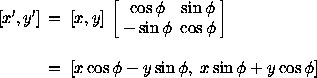
It is even possible to combine transformations represented in this way be multiplying their respective matrices together. This is a very hopeful sign, if we can represent the operations of scaling, rotation and translation all as matrices, and use matrix multiplication to combine them, we will have a very powerful system for manipulating picture structures.
Unfortunately, translation does not fit into our tentative scheme. A translation cannot be represented by a 2x2 matrix. To see why this is so we must realise that a 2x2 matrix is actually generating a linear combination of its inputs, i.e.:
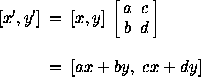
In such a combination, there is no way to represent a term which is independent of both x and y. Translation, however, requires exactly this capability from the transformation apparatus:
A and b are neither coefficients of x or y, this is an Affine Transformation.
We will consider various alternative representations which will allow translations to be represented along with rotations and scaling. One possible approach is to use different operations for the composition of different types of transformation, multiplication for rotation and scaling, with addition reserved for translation.
This is a poor solution, however, because we loose the ability to combine arbitrary transformations into complex ``meta'' transformations. Such an ability is likely to be important, so we will try another approach.
We can force translation to become a matrix multiplication:
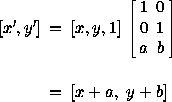
This is better, but we still can't multiply translation matrices by rotation and scaling matrices. Also, the vector ``input'' to this system has a different dimensionality to that which is ``output'', a fact which is untidy, to say the least.
Our problems are solved if we realise that we could make the translation matrix a 3x3 square.
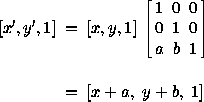
Now the input and output vectors have the same size, we can compose translations by multiplying their matrices, and, best of all, we can convert rotation and scaling matrices into 3x3 form and find that all types of transformation matrices can be composed by matrix multiplication.
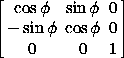
The three types of transformation matrix are, expressed in 3x3 form:
Translation by a, b:

Rotation by :
Scaling by and :

[x,y,1] is called the homogeneous form of the
point .
The screen normally has associated with it integral valued co-ordinates. The transformation matrices work with real numbers, so that fractional scalings and rotations may be accommodated. Many graphics systems provide a layer of software between the integral-valued screen co-ordinate system and the real-valued world system. This software allows the user to issue drawing commands relative to the real-valued world co-ordinate system and have them mapped automatically onto appropriate integral co-ordinates in the screen system.
We usually speak of this software as providing the Windowing Transform. It allows the used to deal with co-ordinates which are appropriate to the problem in hand, centimetres, millimetres, miles, grams, tons, etc.
The windowing transform provides a window into the world co-ordinate system which is mapped onto a clipping region on the screen called the viewport:
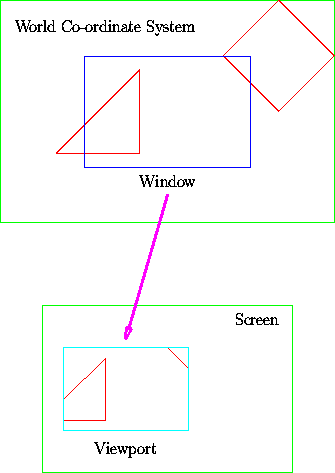
The window and the viewport need not be the same size, but it is important that they have the same aspect ratio so that objects in the world system are not distorted when displayed in the viewport.
Graphics systems such as Core, GKS (the Graphics Kernel System), and Phigs (Programmer's Hierarchical Interactive Graphics System) all support a windowing transform. Note, however, that two of the most common modern graphics interface standards work essentially at screen level only: Microsoft Windows and X. If you need a real-valued world co-ordinate system when working with these standards, you have to set it up yourself, and provide your own windowing transformations (which is actually quite easy to do). As these systems don't have a world co-ordinate system they tend to use the word window to refer to what is called a viewport in the above.