Note: this document introduces applications distributed with Qizx/open. It is important to remember that Qizx/open being above all a class library, these applications are examples of how Qizx/open can be used. Their source code is in all cases available and may be extended by users and application developers.
Java Runtime Environment 1.4 (JRE 1.4.2 or above recommended).
Memory and processor: this depends on the size of XML documents and the expected performances. Qizx/open can handle very large documents (over 100Mb) with a relatively low memory footprint: about 2.5 times the size of the XML entity in bytes, which means that a 100 Mb document needs about 250 Mb in memory. On a Pentium 4 at 3 MHz, Qizx/open can parse documents at a speed of 8 Mb per second or more.
Qizx/open is supported on Windows XP and 2000.
The installation of Qizx/open on Windows is currently manual. It will be replaced by an installer in future versions.
Unpack the Zip archive in a suitable place, namely C:\Program Files: this should create a subdirectory such as qizxopen-1.0 .
Executable scripts (e.g. qizxopen_studio.bat or qizxopen_batch.bat) are found in the sub-directory bin. This sub-directory can be added to your PATH environment variable.
Qizx/open should run on any Unix system supporting the JRE version 1.4.2 +.
The installation of Qizx/open is manual:
Unpack the Zip archive in the desired place: this should create a subdirectory such as qizxopen-1.0 .
Executable shells (e.g. qizxopen_studio or qizxopen_batch) are found in the sub-directory bin. This sub-directory can be added to your PATH environment variable.
| LICENSE.txt | License file. (Mozilla Public License) |
| docs | Documentation. Contains both PDF and HTML versions of documents. See index.html for details. |
bin | Contains launcher scripts for several Qizx/open applications: (.bat extension on Windows). These applications are documented below.
|
| lib | Main library jar of Qizx/open: qizxopen.jar. Executable with java -jar or by double-click on Windows. Jar for Qizx/open studio: qizxopen_studio.jar. Executable with java -jar or by double-click on Windows. Auxiliary jars: Sun's XML catalog resolver resolver.jar |
| config | A place for Java resources used by applications (part of classpath). By default contains XML catalogs and DTDs for XHTML et Docbook. |
| examples | miscellaneous examples and demos. |
| xqsp | XQuery Server Pages: a J2EE Servlet which runs XQuery scripts directly, bundled with demos. Contains a Ant build file to create the war archive. |
| src | Source code. Contains a Ant build file allowing to recompile Qizx/open. For XQuest, available only with a special license. |
This is a GUI that allows to edit and run XQuery scripts. In Qizx/open, the purpose is mainly XQuery experimenting and training.
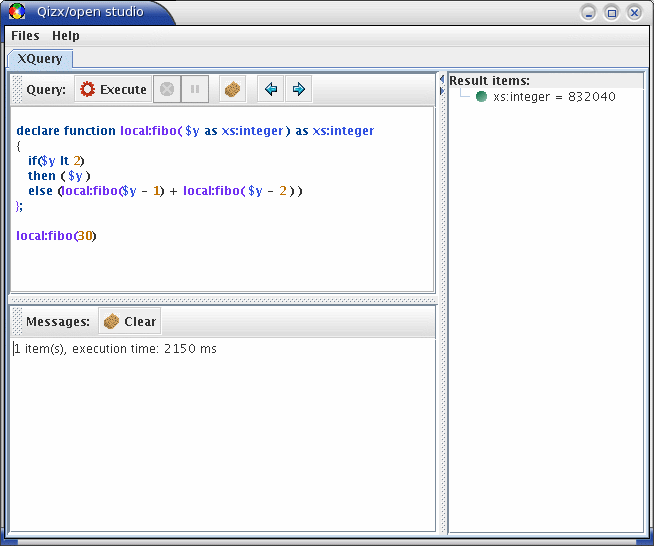
Description of the GUI:
There are two main tabs:
Query tab: this is a query execution facility. It is composed of 4 areas:
Query editor: a XQuery script can be typed here. The editor will perform syntax highlighting.
It is possible to save the current query into a file, or to load a query from a text file.
The editor also manages a history of executed queries. The two blue arrows navigate in the history. Note: the history is currently not saved at the end of the session.
Execution tool bar: the "Execute" button runs the edited query. The red "Stop" button aborts the execution.
The yellow "Pause" button suspends the execution. Once suspended, it becomes green, meaning "Resume".
Message area: compilation and execution errors are displayed here. It can be erased with the "Clear" button.
Result area: displays the results returned by the evaluation of a query. Results are displayed in a tree view:
Simple result items are displayed with their type
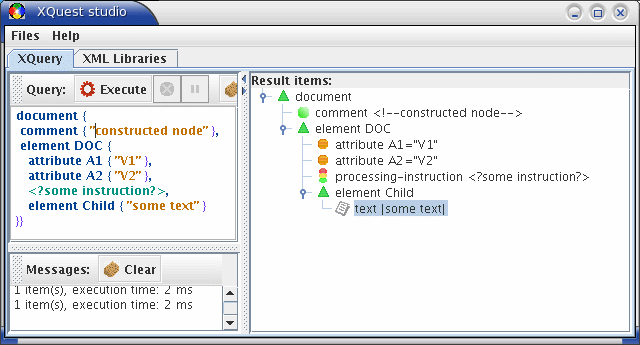
Node items are displayed as a tree structure (not as serialized XML): the nodes of the structure can be expanded and are displayed with different icons according to their type: green triangle for Elements, orange circle for Attributes etc. Example:
XML Library browser: ( absent in Qizx/open): when XQuest studio is connected to a XML Library Server (either remote or embedded), this tab allows to browse :
the XML Libraries managed by the server,
the Collections contained in each XML Library,
the XML Documents inside Collections.
Option switches
As for other Qizx/open applications, Qizx/open studio can be executed with command-line options:
- -server registry_name
connect to a remote server (registry_name: simple name if local registry, or //host[:port]/name)
- -remote
shorthand for: -server 'XQuestServer'
- -Cname=value
specify a server connection property (e.g. username and password).
- -Dvariable_name=value
initialize a XQuery global variable.
- -- (double dash)
pass all following arguments to XQuery expressions: arguments are available in variable '$arguments', which is a sequence of strings.
- -Xoption=value
set a XML serialization option. (See serialization documentation). For example -Xmethod=xhtml.
- -docbase <path>
define base URI for locating parsed XML documents
- -modbase <path>
define base URI for locating XQuery modules
- -input <URI>
URI of a document used as input (XQuery function input())
- -xinput <fragment>
a XML fragment used as input (XQuery function input())
- -timezone duration
Defines the implicit timezone in the dynamic XQuery context. The value must be in xs:duration form, for example -timezone -PT5H.
- -collation uri
Defines the default collation for string comparisons.
Collations are supported through Java collators. The URI of a collation follows the Java convention for locales: for example "en" or "fr-CH" can be used as collation URIs. A collation URI can be followed by a "fragment" or "reference" that has the value "primary", "secondary" or "tertiary", defining the "strength" of the collator (see the Java documentation for more details).
For example, the expression contains("The next café", "CAFE", "en#primary") should return true, because the collation with strength primary ignores case and accents.
The special URIs codepoint and "http://www.w3.org/2003/05/xpath-functions/collation/codepoint" refer to the basic Unicode codepoint matching (or absence of collation). This is the default collation.
- -ext <full.class.name>
Allow specifically this class as Java extension.
- -doc.cache <size_in_Kb>
define the parsed document cache size (default 8 Mb).
- -tex
verbose display of exceptions
The purpose of these tools is to run XQuery scripts in batch mode. For learning XQuery or getting accustomed with Qizx/open, it is recommended to use Qizx/open Studio, the GUI Tool.
qizxopen_batch is a command-line application of Qizx/open. Its purpose is to run XQuery scripts in batch mode.
This tool is launched by the qizxopen_batch wrapper scripts found in sub-directory bin (bin\qizxopen_batch.bat on Windows and bin/qizxopen_batch on Unixes).
Usually the tool will be run with an argument which is the path of a script file:
> qizxopen_batch myquery.xq
This tool can also be invoked without argument: it starts in interactive mode.
> qizxopen_batch
Qizx/open 1.0
[interactive mode]
Query ?
It can also be invoked by running directly from the executable xquest Jar archive:
java -jar qizxopen.jar arguments...
To get help on option switches:
qizxopen_batch -help
Option switches
- -server registry_name
connect to a remote server (registry_name: simple name if local registry, or //host[:port]/name)
- -remote
shorthand for: -server 'XQuestServer'
- -Cname=value
specify a server connection property (e.g. username and password).
- -Dvariable_name=value
Defines the value of a global variable. For example if the variable is declared like this:
declare variable $output external;
then the option -Doutput=foo initializes $output with the string value "foo".
If the variable is declared with a type, an attempt to cast the string value to the declared type is made.
If the variable is declared with an initial value, this value is overridden.
- -- ...
The double dash switch is used to pass command-line arguments to a XQuery script. It stores all following command-line tokens into the predefined variable $arguments.
- -Xoption=value
Defines a serialization option for result output. For example -Xmethod=html produces results in HTML markup.
- -out file
output to a file (defaults to standard output)
- -serial
Direct evaluation and serial output (more efficient mode, no tree construction): the query must evaluate as a well-formed document.
- -docbase <path>
define base URI for locating parsed XML documents
- -modbase <path>
define base URI for locating XQuery modules
- -input path
Defines a single document as default input (XQuery function input()).
- -xinput <fragment>
a XML fragment used as input (XQuery function input())
- -timezone duration
Defines the implicit timezone in the dynamic XQuery context. The value must be in xs:duration form, for example -timezone -PT5H.
- -collation uri
Defines the default collation for string comparisons.
Collations are supported through Java collators. The URI of a collation follows the Java convention for locales: for example "en" or "fr-CH" can be used as collation URIs. A collation URI can be followed by a "fragment" or "reference" that has the value "primary", "secondary" or "tertiary", defining the "strength" of the collator (see the Java documentation for more details).
For example, the expression contains("The next café", "CAFE", "en#primary") should return true, because the collation with strength primary ignores case and accents.
The special URIs codepoint and "http://www.w3.org/2003/05/xpath-functions/collation/codepoint" refer to the basic Unicode codepoint matching (or absence of collation). This is the default collation.
- -wrap
wraps the displayed results in description tags. For example with -wrap the expression 1, "a" would display:
Query ? 1, "a"
<?xml version='1.0' encoding='UTF-8'?>
<query-results>
  <item type="xs:integer">1</item>
  <item type="xs:string">a</item>
</query-results>
instead of:
Query ? 1, "a"
1 a
-> 2 item(s)
- -q
Quiet mode: do not display evaluation times.
- -jt
trace load and use of Java extension functions (for debugging).
- -tex
verbose display of run-time exceptions (for debugging).
The purpose of this application is to provide a XQuery server remotely accessible by clients. It is meaningful mainly for XQuest, so that a XML Library can be queried from different machines.
However Qizx/open can also work as a server: although it can only use parsed documents stored in memory and has no indexes, it can still be quite effective for small applications.Of course, running in server/client mode is less efficient than using an embedded XQuery engine. It is recommended to minimize exchanges between client and server by executing most of the work on the server and only retrieving final results in the client. The Java API allows to retrieve XML results efficiently as serialized XML text or as trees.
Running Qizx/open in Server/Client mode
The following steps are required:
Ensure that rmiregistry is running: Qizx/open server works with Java RMI. The RMI registry is used by clients to locate the desired server by its name.
Caution: the Java 5.0 registry can crash unpredictably on some platforms. It is recommended to use the 1.4 registry.
The server is launched by the qizxopen_server wrapper script found in sub-directory bin (bin\qizxopen_server.bat on Windows and bin/qizxopen_server on Unixes).
The server binds to a name in the rmi registry. This name is used by the clients to connect to the server.
The name can be defined with the -name option when launching the server. By default it is "XQuestServer".
The maximal memory size for the server is by default 512 Mb, it may be customized by modifying the script.
The clients (Qizx/open studio or Qizx/open batch) can then connect to the server by specifying a command-line option -server server_name (or the shorthand -remote which uses the default "XQuestServer").
Option switches
- -name <name>
define the server name in rmi registry. A registry on a remote host can be specified in the form: -name //registry_host[:registry_port]/name.
- -port <port>
define server port.
- -docbase <path>
define base URI for locating parsed XML documents
- -modbase <path>
define base URI for locating XQuery modules
- -timezone duration
Defines the implicit timezone in the dynamic XQuery context. The value must be in xs:duration form, for example -timezone -PT5H.
- -collation uri
Defines the default collation for string comparisons.
Collations are supported through Java collators. The URI of a collation follows the Java convention for locales: for example "en" or "fr-CH" can be used as collation URIs. A collation URI can be followed by a "fragment" or "reference" that has the value "primary", "secondary" or "tertiary", defining the "strength" of the collator (see the Java documentation for more details).
For example, the expression contains("The next café", "CAFE", "en#primary") should return true, because the collation with strength primary ignores case and accents.
The special URIs codepoint and "http://www.w3.org/2003/05/xpath-functions/collation/codepoint" refer to the basic Unicode codepoint matching (or absence of collation). This is the default collation.
- -jt
trace load and use of Java extension functions (for debugging).
- -tex
verbose display of run-time exceptions (for debugging).